Square metres tell you how much. They do not tell you where.

A facade is not a rectangle. It has corners, a gable, a terrace slab, a boiler room door and a window in an awkward place. An insulation board calculator takes the wall area, divides it by one board and adds ten percent. That number is blind: it cannot say which boards end up as slivers, where the joints run into a window corner, or which rows have to reach around the corner.

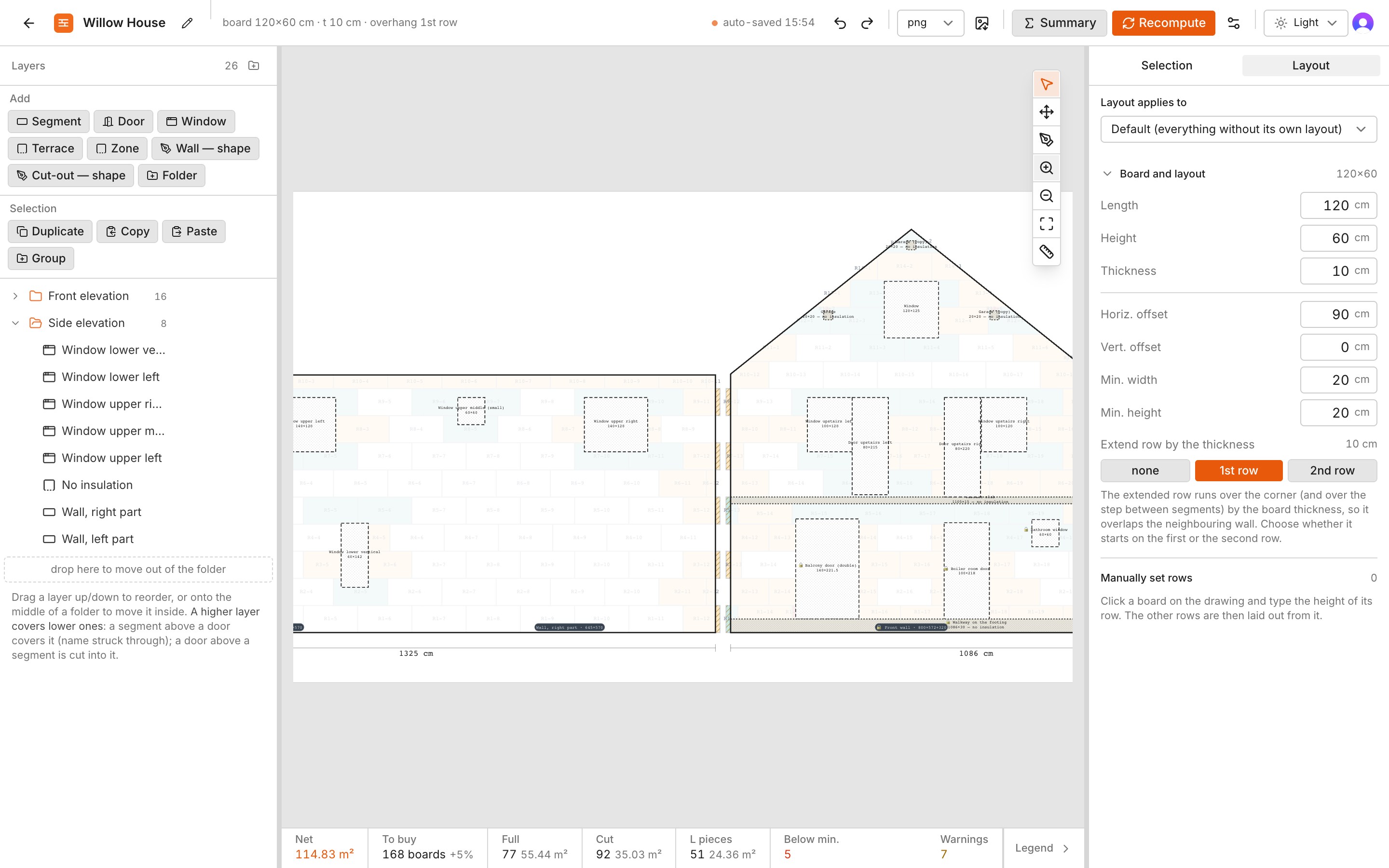
Fasadero draws the layout the way a careful crew would lay it, board by board, and counts what it drew. The number comes with a picture, so you can argue with it.

What the drawing shows you

Each thing on the sheet answers one question you would otherwise find out on the scaffold.

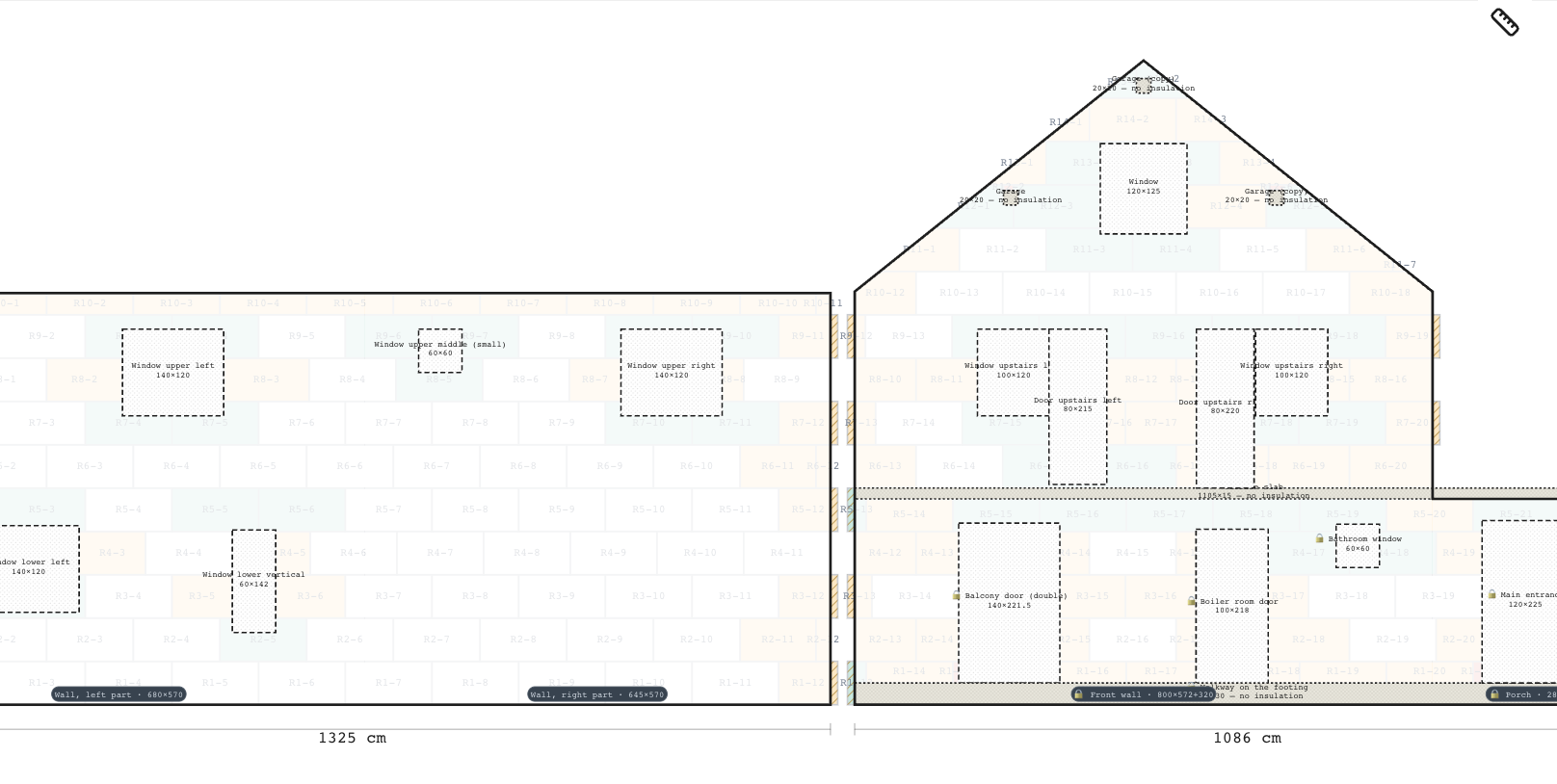
Rows shifted like brickwork, corners that lock together

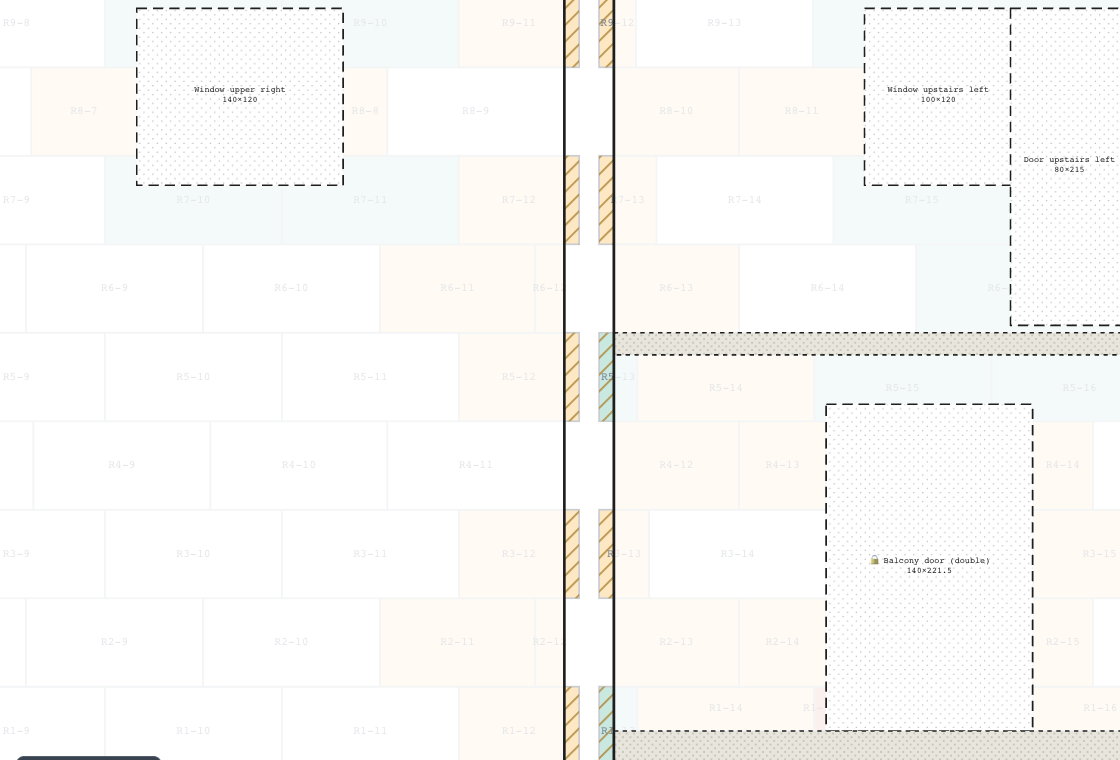
Every second row is shifted by half a board, so the joints are staggered and no vertical joint runs through two rows. At a corner one wall extends the odd rows by the board thickness and the neighbour extends the even rows, so the two walls grip each other instead of meeting on a straight seam.

  • You choose which rows overhang, per wall and per edge
  • The hatched strips are the overhang: you can see it on the sheet
  • A storey, a plinth row or a different board per row are all one setting
Close-up of a corner: the hatched overhang strips alternate between the two walls, row by row.

Detail · corner between the side and the front elevation

Windows and doors cut the way the wall is built

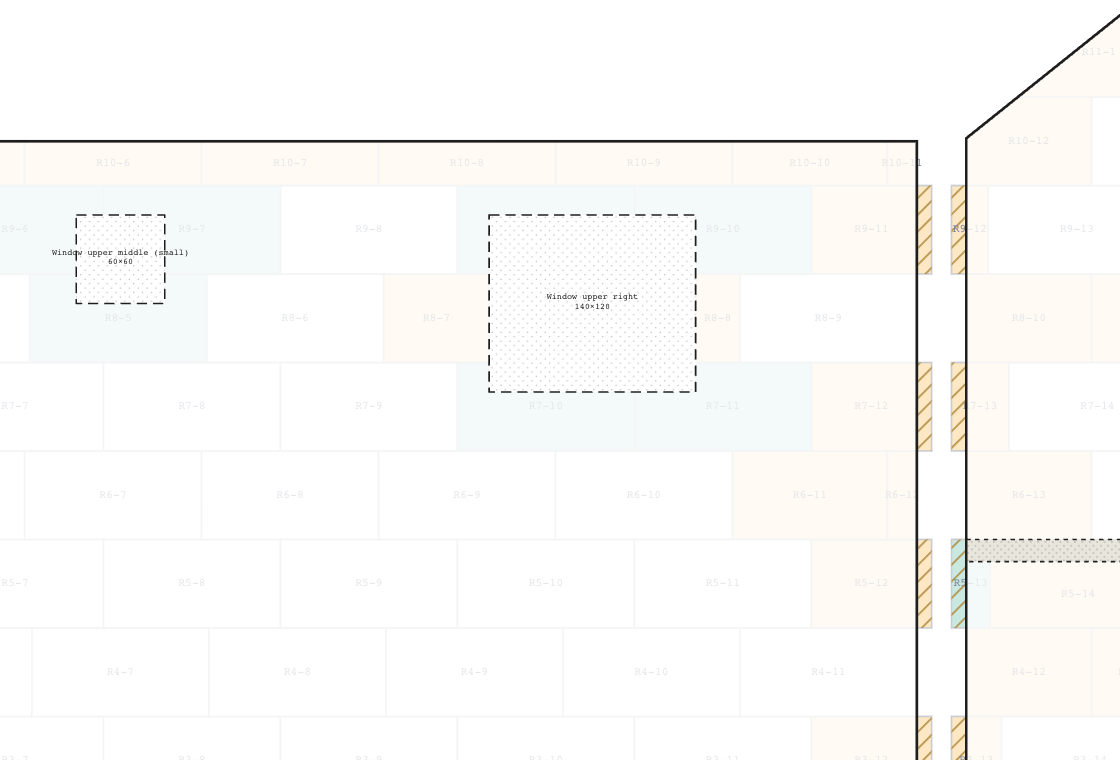
An opening is not simply subtracted. The rows are laid up to it and past it, so every corner of a window sits inside one whole L-shaped piece and no joint runs into the corner. That joint is where the render cracks later, and the drawing keeps it away.

  • Windows, doors, terraces and zones with no insulation are each their own thing
  • A terrace slab that crosses a row starts a new row above it, so no sliver is left
  • Odd shapes are fine: draw the outline point by point
Close-up of two windows: the boards around them are L-shaped pieces that wrap each corner.

Detail · window upper middle, 60 × 60, wrapped by whole pieces

Pieces too small to trust are marked, and fixed

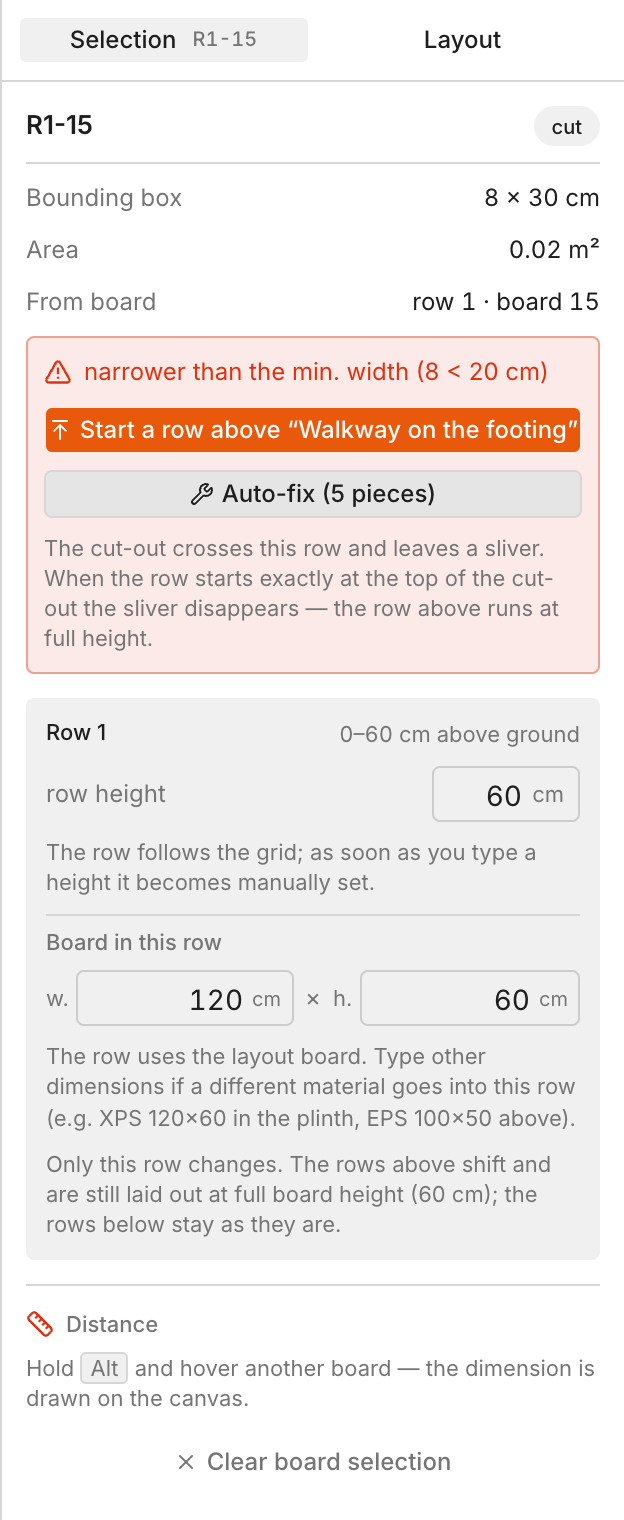
A strip 8 cm wide will not hold on the wall and will not survive the cut. Fasadero colours every piece below your minimum in red, tells you which board it came from and why it is there, and offers to move the row so it disappears.

  • Your own minimum width and height, per layout
  • Auto-fix proposes row heights and shows what changes before you accept
  • Nothing moves without you: undo is one keystroke away
The properties panel of a selected piece: 8 by 30 cm, narrower than the minimum width, with the buttons to start a row above the cut-out or to auto-fix five pieces.

Detail · piece R1-15, 8 × 30 cm, below the 20 cm minimum

A material list you can order from

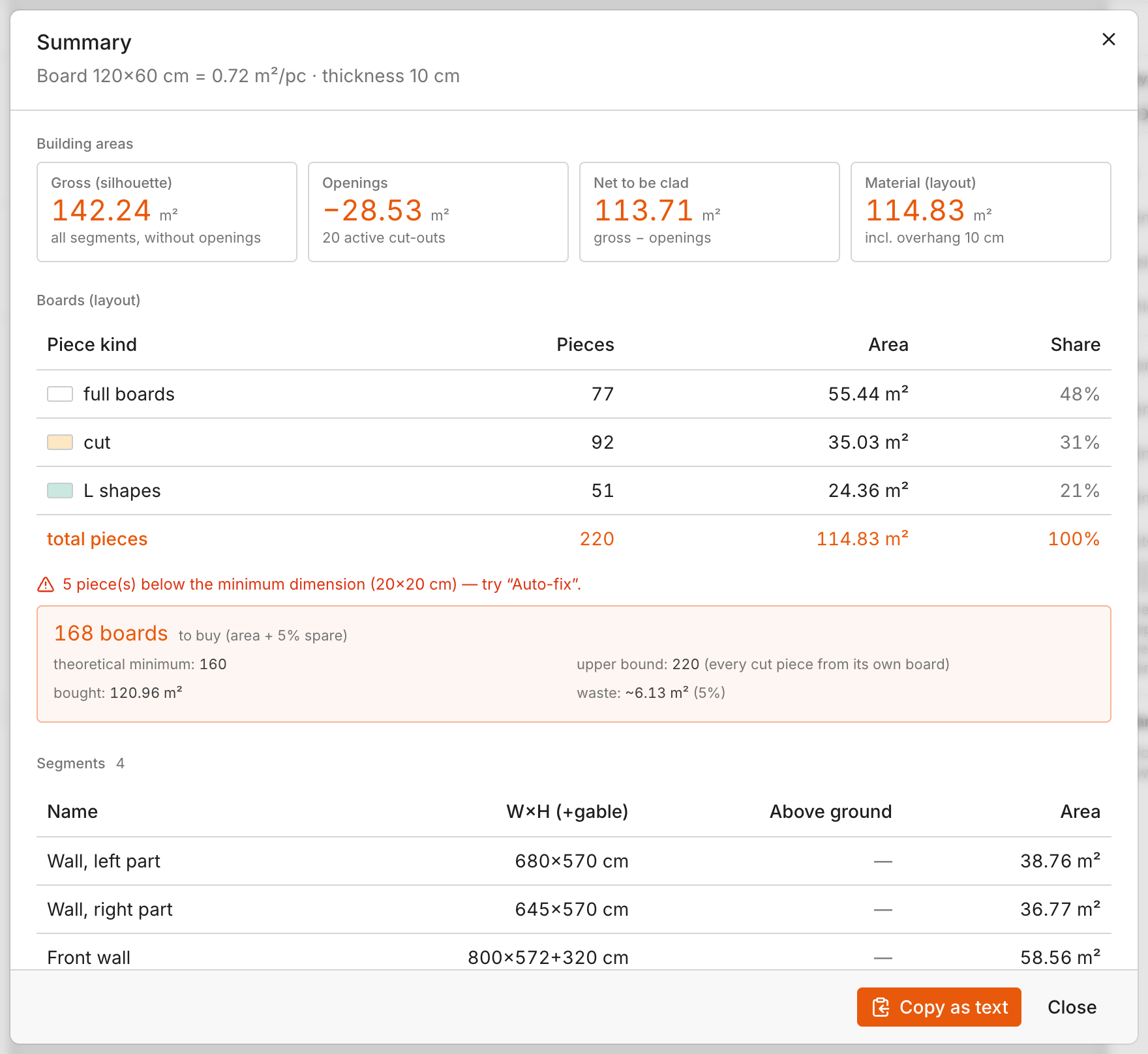
The summary reads the drawing: gross wall, openings taken out, net to be clad, then the pieces by kind and the boards to buy with a spare. It gives a range, not a promise: a theoretical minimum, a recommended number with reserve and an upper bound where every cut piece comes from its own board.

  • Different boards are counted separately, never mixed into one number
  • Copy the list as text into a quote or an order
  • Export the sheet as an image for the crew and the client
The summary dialog: building areas, pieces by kind with their share, and 168 boards to buy with the theoretical minimum and upper bound.

Summary · Willow House · 168 boards, minimum 160, upper bound 220

Every house in one place

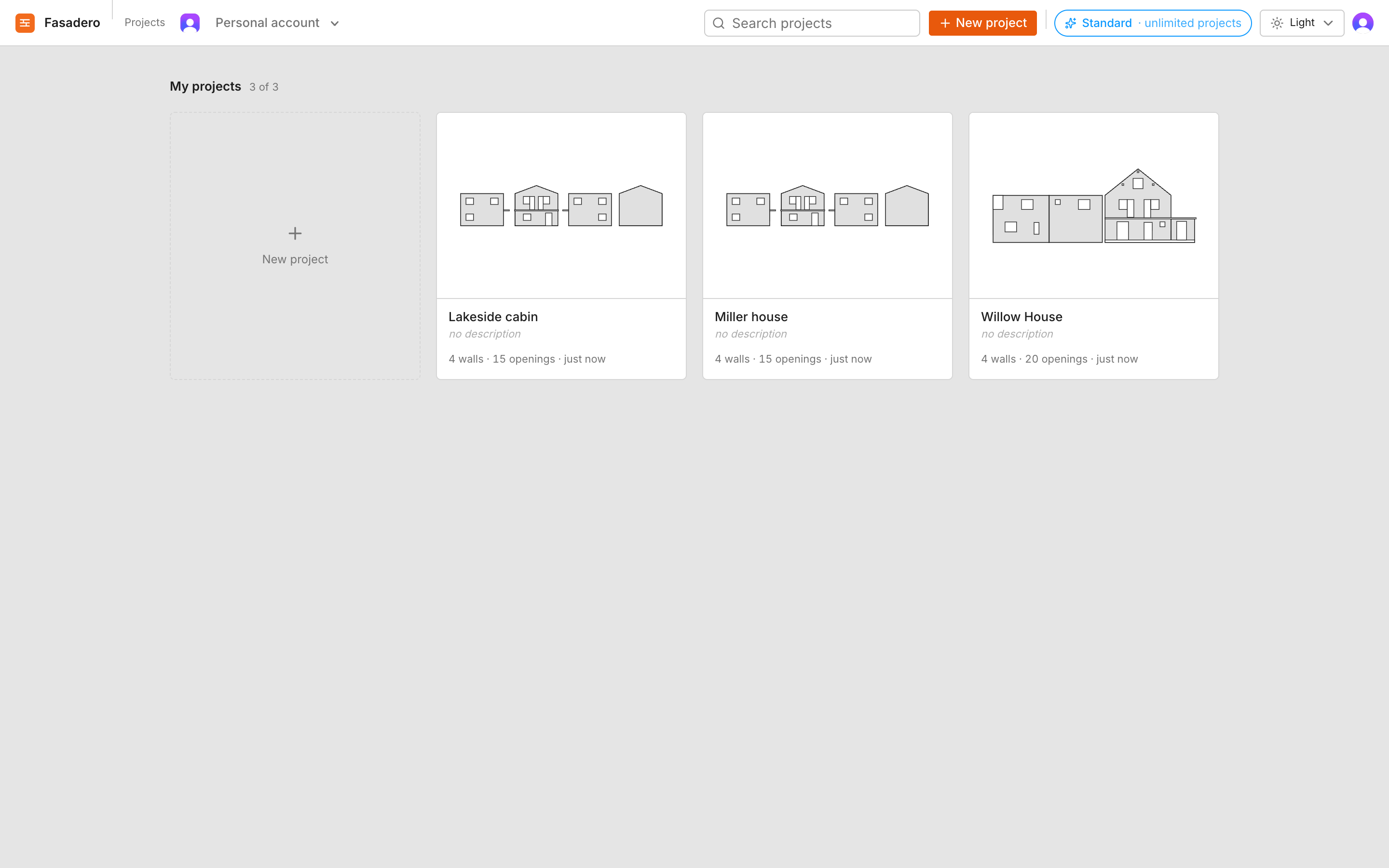
Projects live in your account, with a silhouette on the card and the last change. Open one on the office computer, keep going on the laptop on site. Duplicate a house to try a second board size and compare the two lists side by side.

  • Nothing is stored in the browser: sign in anywhere
  • Light and dark editor, the sheet itself stays white for printing
  • On the Team package the whole company shares one set of projects
The projects page: three project cards with a silhouette of each house, the wall and opening counts and the time of the last change.

Projects · three houses, each with its own layout and list

Your house, drawn and counted.

Four steps. You do not need to know a drawing program; if you can read a plan you can draw it here.

Step 1

Draw the walls

One wall per side of the house, with its height above ground. Add a gable, a storey or a free outline. Sides sit next to each other on one sheet so the corners meet.

Step 2

Place the openings

Windows, doors, the terrace slab, the part of the garage that gets no insulation. Type the sizes or drag them into place; the sheet shows every dimension.

Step 3

Set the board

Board size and thickness, which rows overhang the corner, the minimum piece you are willing to fit. Change any of it and the whole house is laid out again.

Step 4

Read the list

Fix the red pieces, open the summary, copy the list into the order. Export the sheet for the crew, so they lay what you counted.

What changes when the count comes with a drawing

Counting by area and a percentage
Counting from the layout
The order
One number for the whole house, a guess on top for the cuts.
A minimum, a recommended number with reserve and an upper bound, per board size.
Corners
Found out on the scaffold, usually when the first wall is already up.
Decided per wall and per edge on the sheet, before anything is glued.
Windows and doors
The crew cuts as it goes; joints land where they land.
Each corner sits inside one whole L piece. Joints stay out of the corners.
Slivers
Noticed when a strip breaks in the hand.
Marked in red on the drawing and moved out of the way with one click.
Checking the work
You trust the contractor or pay someone to look.
Anyone can hold the sheet against the wall and see whether the rows match.
The second quote
Start the maths again.
Duplicate the house, change the board, read the new list.

Who draws with it

The same sheet does a different job for each of them.

The self-builder

One house, once. Wants to order the right amount, not twice, and to know whether the crew is laying it properly.

The facade contractor

Several houses a month. Needs a quote fast, a list the supplier accepts and a sheet the crew can follow without questions.

The construction company

Estimators, site managers and the office on one set of projects. The layout is agreed in the office, not improvised on site.

The engineer and the architect

Wants the drawing to be exact about itself: gable slopes, storeys, free outlines, dimensions on every edge, and a range instead of a promise.

The board supplier

Turns a customer's plan into a firm order, per board size, with the spare already counted, and sends a sheet along with the pallets.

Questions people ask before they draw

How is this different from an insulation board calculator?

A calculator takes the wall area, divides it by the area of one board and adds a percentage for waste. Fasadero lays every board on a drawing of the facade first, with staggered rows, corners that interlock and the openings cut out, and then counts what it drew. You get the number of boards to buy, and you also see where the cuts and the small pieces end up.

Is it for external wall insulation, ETICS or EIFS?

Yes. They are names for the same job: insulation boards fixed to the outside of a wall and rendered over. It is called external wall insulation (EWI) in the UK and Ireland, ETICS across Europe and EIFS in North America. Fasadero plans and counts the boards; adhesive, mesh and render you still work out from the net wall area in the summary.

Is the number of boards exact?

The drawing is exact about itself. The wall is not the drawing: boards break, crews cut differently, a corner turns out not to be square. That is why the summary gives a range, a theoretical minimum, a recommended number with reserve and an upper bound, and why you set the spare yourself. Treat it as a good estimate with a picture attached, not a promise.

Which boards and thicknesses does it know?

Any rectangular board: you type the length, the height and the thickness. EPS 100 × 50, 120 × 60, XPS for the plinth, mineral wool in the same sizes. A row can have its own board, so a plinth row in XPS under EPS above is one setting, and the two are counted separately.

Do I need to know a drawing program?

No. A wall is a rectangle with a height above ground; a window is a rectangle at a position. You type sizes or drag things, the sheet shows every dimension, and arrow keys nudge by a centimetre. Free outlines are there for the odd gable or bay, not required for a normal house.

How does it handle the corner between two walls?

Each side of the house is a wall on the same sheet. For every wall edge you choose whether the odd rows or the even rows overhang by the board thickness, and the neighbouring wall takes the opposite choice, so the rows lock into each other. The overhang is drawn as a hatched strip, so you can check it before the first board is glued.

Why are L-shaped pieces a good thing?

Because a window corner has to sit inside one whole piece. If two boards meet at the corner, the joint runs straight into it, and that is where the render cracks. Fasadero lays the rows so the corner is wrapped by an L, and only flags a piece when one of its legs is thinner than your minimum.

What if it turns out not to be for me?

Then you get your money back. There is no trial period: a package is paid from the first day, and it comes with a 30-day money-back guarantee. Write to contact@fasadero.com within 30 days of your first payment and we refund it in full, no reason needed. Your drawings stay in your account.

Can my colleagues work on the same houses?

On the Team package, yes: you create a team, invite colleagues and every member sees and edits the same projects. On Starter and Standard the projects are yours alone, but you can sign in from any computer.

What do I get out of it at the end?

The sheet as an image for the crew and the client, and the summary as text for a quote or an order: areas, pieces by kind, boards per size with the spare. Both are made from the same drawing, so they never disagree.